


In today’s business environment, where agility, visibility, and operational efficiency are table stakes, ERP systems are not optional; they are mission‑critical. Yet, despite the proliferation of robust ERP solutions, many implementations still fail to deliver promised value. The reason isn’t technology alone; it’s the lack of a strategic design before the ERP deployment mindset.
Most organizations jump into configuration and module setup without understanding what they truly need, how users will work with the system, and how key business processes should evolve. When design is overlooked, problems emerge during ERP implementation phases, derail timelines, inflate costs, and diminish user adoption.
In this comprehensive guide, we’ll unpack why design before deployment is the principle that separates successful ERP projects from costly failures. We’ll integrate proven ERP implementation best practices with actionable insights on planning, change management, data migration, training, and go‑live preparation so that you can build ERP success from the ground up.
Why Design Before ERP Deployment Matters
Too many ERP initiatives begin with software selection and configuration before the organization has clearly defined:
- What processes should the system support
- How each department functions today and in the future
- What outcomes does the business expect from the implementation
This oversight creates a scenario where design is an afterthought rather than the foundation for every subsequent step in the ERP implementation strategy.
Do You Know?
Over 60% of ERP failures are linked to insufficient upfront planning and poor requirements definition. Without detailed design, organizations often struggle with scope creep, integration gaps, and low user adoption rates.
A disciplined ERP design phase ensures that technology serves the business, not the other way around. Good design sets the blueprint for smooth execution throughout the rest of the ERP lifecycle.
The Foundation: ERP Implementation Planning
Before a single configuration is made, ERP implementation planning must establish clarity on objectives, scope, stakeholders, and success metrics.
Key Planning Activities:
- Define business goals and KPIs for the ERP initiative
- Assemble the right team, including business process owners and technical experts
- Map current workflows to identify gaps and pain points
- Identify compliance, reporting, and integration requirements
- Allocate resources and budget realistically
Note: Planning isn’t a checklist item; it’s the strategic roadmap that informs every other phase. Rushing past this stage is a leading cause of project overruns and misaligned solutions.
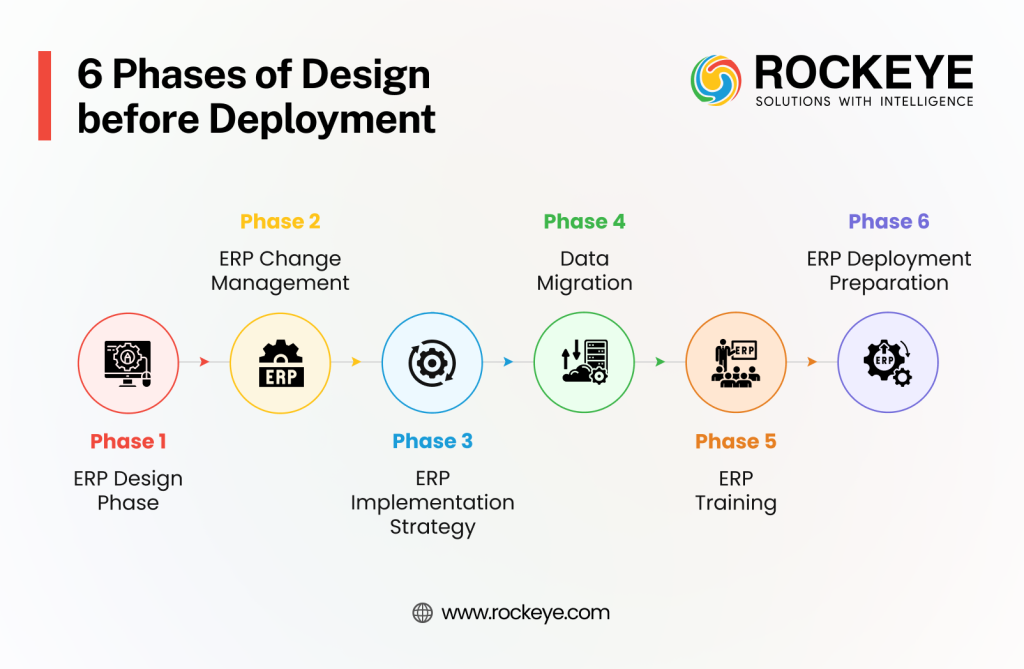
Phase 1: ERP Design Phase — Blueprint for Success
Design is where design before ERP deployment becomes tangible. This phase transforms high‑level requirements into a detailed, executable system architecture and process model.
What Good ERP Design Includes:
- Workflow modeling for core business functions
- Role and permission structures aligned with organizational hierarchy
- Data architecture planning (master data, transaction data maps)
- Integration design (APIs, external systems, third‑party tools)
- Reporting and analytics blueprint based on required KPIs
Effective design isn’t about copying old processes; it’s about reimagining workflows to exploit ERP capabilities for better performance and growth. A thorough ERP design phase continuously incorporates feedback from end users and key stakeholders to minimize resistance later.
Benefits of Proper Design Before Deployment:
- Reduces rework during configuration
- Improves alignment between business needs and system behavior
- Increases confidence among users and sponsors
Good Read: How Our Cloud ERP Can Help Your Business
Phase 2: ERP Change Management — Build Human Readiness
Technology changes how people work, and people resist change. That’s why ERP change management is as crucial as any technical phase.
Change Management Best Practices:
- Communicate early and often about project goals and benefits
- Create change champions in every department
- Educate staff on what changes to expect and why they matter
- Address fears and misinformation proactively
- Track sentiment through surveys or focus groups
Embrace change management not as “soft” organizational support but as a strategic element of ERP success. When teams understand what to expect and why it matters, adoption increases and resistance declines.
Phase 3: ERP Implementation Strategy in Action
With a solid design and change plan, it’s time to execute. The ERP implementation strategy must balance thoroughness with agility.
Implementation Best Practices Across Phases:
- Adopt a phased rollout rather than a rushed big bang deployment. It reduces risk and allows learning from early waves.
- Use pilot testing in controlled environments before wide deployment.
- Align design with business processes, not legacy methods, to ensure future‑proof workflows.
Each phase must have clear deliverables, checkpoints, and quality gates to ensure nothing moves forward with ambiguity. Silos between IT and business units are bridged through collaborative governance and regular progress reviews.
Must Read: ERP Implementation Lifecycle Explained: From Planning to Post Go-live Success
Phase 4: Data Migration ERP Best Practices
Data is the lifeblood of ERP. Transitioning data from legacy systems to new platforms is one of the riskiest parts of any ERP implementation.
Data Migration Best Practices:
- Cleanse and validate data before migration to remove duplicates and inaccuracies.
- Map legacy fields to target ERP structures with clarity to prevent loss.
- Establish strong data governance policies for ongoing data quality.
- Perform iterative test migrations to catch issues early.
Rather than migrating all historical data mindlessly, prioritize essential data sets that drive daily operations and reporting. This approach reduces clutter and delivers a cleaner “ERP single source of truth.”
Phase 5: ERP Training Best Practices
Even well‑designed ERP solutions can fail if people don’t understand how to use them.
Training Approaches That Work:
- Role‑based training modules tailored to job functions
- Hands‑on practice sessions and workshops
- Microlearning modules for quick reference
- Advanced sessions for power users and administrators
ERP training best practices ensure that learning isn’t a one‑time event before go‑live, but an ongoing process. When users feel competent and confident, productivity rises, and resistance evaporates.
Phase 6: ERP Go Live Preparation
Go‑live isn’t simply flipping a switch; it’s the culmination of careful preparation.
Critical Steps Before Go‑live:
- Validate configurations against design requirements
- Run full regression testing
- Confirm data migrations are complete and accurate
- Communicate schedule and contingency plans to all teams
- Ensure support resources are ready for day one
Going live without these checks dramatically increases the risk of operational disruption.
Post Go‑live: Support and Continuous Improvement
Even the best ERP implementations are not “set and forget.” After go‑live, organizations should:
- Monitor KPIs and user feedback
- Provide ongoing support and refresher training
- Continue improving processes informed by real‑world usage data
Successful organizations see ERP as a foundation for continuous operational excellence, not just a deployment event.
Conclusion: Design Before ERP Deployment Is Non‑negotiable
Integrating design before ERP deployment into your ERP implementation strategy is not an optional “nice to have”; it’s the strategic differentiator separating ROI‑driven transformations from stalled projects.
By embedding a robust ERP design phase, aligning stakeholders early, managing change rigorously, and following best practices across planning, data migration, training, and go‑live preparation, businesses create a resilient foundation for growth.
Remember: Tools are only as effective as the context in which they are deployed. Investing time and energy in design pays compounding dividends throughout the life of your ERP system.
Successful ERP implementations are achieved not by rushing into technology, but by thoughtfully designing how technology will amplify business value.

Frequently Asked Questions
What is the importance of the design phase in ERP implementation?
The importance of the design phase in ERP implementation lies in bridging the gap between raw software features and specific business goals. A robust design phase prevents “feature creep,” reduces the need for expensive post-go-live fixes, and ensures that the system architecture supports long-term scalability. Without this phase, organizations risk deploying a tool that tech teams understand, but business users cannot use.
How do you design ERP workflows for maximum efficiency?
To learn how to design ERP workflows, you must start with business process mapping for ERP. It involves document management of your “As-Is” processes and identifying bottlenecks before translating them into “To-Be” digital workflows. Effective design focuses on minimizing manual data entry, automating approval loops, and ensuring data flows seamlessly between departments like Finance, HR, and Supply Chain.
What are the core ERP solution design principles?
The primary ERP solution design principles include:
- Standardization: Favoring industry best practices over unique, localized habits.
- Data Integrity: Ensuring a “single source of truth” across the enterprise.
- User-Centricity: Designing interfaces that align with actual employee tasks.
- Flexibility: Building a core that can adapt to future regulatory or market changes.
ERP Configuration vs. Customization Design: Which is better?
When comparing ERP configuration vs customization design, the general rule is “Configure first, Customize only when it provides a competitive advantage.” Configuration involves using the software’s built-in toggles to meet needs, which is easier to maintain during updates. Customization consists of writing new code, which adds complexity and cost but allows for highly specialized business requirements.
What should be included in a pre-deployment ERP testing plan?
Pre-deployment testing of ERP should go beyond basic bug hunting. It must include ERP prototype testing (or User Acceptance Testing) where actual employees run “Day-in-the-Life” scenarios. It ensures the design holds up under real-world stress, validates data migration accuracy, and confirms that the security roles are correctly assigned.
Why is change management in ERP deployment often overlooked?
Change management in ERP deployment is the “human side” of the design. While technical teams focus on code, change management focuses on user adoption. If employees aren’t trained or don’t understand the “why” behind the new design, they will find workarounds, leading to poor data quality and failed ROI, regardless of how good the software is.
What is a high-level ERP deployment checklist?
A strategic ERP deployment checklist must include:
- Completion of Business Process Mapping.
- Finalization of the Functional Design Document (FDD).
- Cleanse and Validate Data for Migration.
- Conduct Rigorous ERP Prototype Testing.
- Execute a Formal Change Management and Training Plan.
- Perform a “Go/No-Go” Technical Readiness Audit.