
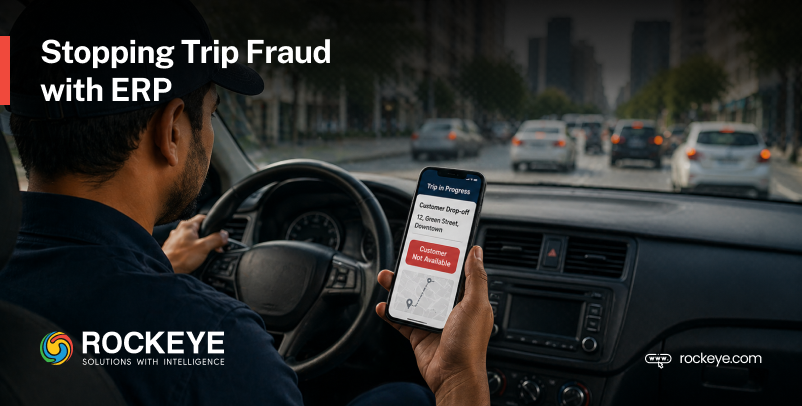


A driver may mark “customer not available,” but the vehicle never reached the customer’s location. A fuel claim may look normal until the odometer reading shows extra kilometers that were never part of the route. The issue is not always one dramatic fraud event; often, it is a series of small leakages hiding in everyday processes.
That is where ERP becomes more than back-office software.
A well-designed ERP system acts like a control tower for every trip, connecting orders, inventory, drivers, vehicles, routes, fuel, delivery proof, cash collection, returns, and approvals into one traceable workflow. Instead of relying on calls, spreadsheets, screenshots, and memory, ERP gives the business a structured way to verify what actually happened.
This matters because fraud and operational leakage are no longer minor problems. There is a simple truth: whenever shipment movement, return validation, payment verification, and exception handling are weak, leakage finds a way in.
The goal is not to treat every driver, customer, vendor, or warehouse employee as suspicious. The real goal is to design a cloud-based, real-time approved ERP where people are protected, suspicious activity is visible, and discrepancies are caught before they become expensive.
Why Trip-Level Control Matters
Many businesses track orders, but they do not always control trips with the same discipline. That gap matters because an order tells you what should happen, while a trip tells you what actually happened between the warehouse gate and the customer’s doorstep.
Think of a delivery trip as a chain of custody. Every package loaded, every kilometer driven, every delivery attempted, every litre of fuel consumed, every rupee collected, and every item returned should leave a digital footprint inside ERP. When that chain is complete, the business can investigate discrepancies quickly. When that chain is broken, people start guessing.
A strong ERP trip-control system connects:
Trip ID → driver → vehicle → package scan → route → GPS/geofence → delivery proof → NDR reason → COD → fuel → expenses → returns → trip closure
Once this flow is controlled, fraud becomes harder to commit and easier to detect.
ERP Controls That Prevent Trip Fraud and Discrepancies
1. Trip Creation Control
Every delivery run should begin with a unique Trip ID inside ERP. This Trip ID becomes the master reference for the driver, vehicle, route, packages, COD, fuel, expenses, delivery status, and return reconciliation.
Without a Trip ID, a vehicle leaving the warehouse is like a parcel without a tracking number. You may know it exists, but you cannot confidently prove where it went, who handled it, what it carried, or what came back.
| ERP should capture | Why it matters |
| Trip ID | Creates one tracking reference |
| Driver and helper details | Fixes accountability |
| Vehicle number | Prevents unauthorized vehicle use |
| Planned route and distance | Supports route and fuel validation |
| Assigned orders | Links packages to the trip |
| Expected COD | Supports cash reconciliation |
| Planned start/end time | Supports time-window monitoring |
For example, if Trip 248 is planned for 42 orders, 96 kilometers, and ₹78,000 COD, ERP can later compare the actual distance, delivery count, cash submitted, and returned packages against the original plan. This prevents unofficial trips, fake dispatches, route misuse, and unassigned driver activity.
ERP rule: No Trip ID, no trip.
2. Trip Loading Verification
Loading is where many problems quietly begin. The wrong package may be loaded into the wrong vehicle, a package may be marked as loaded without physically entering the vehicle, or a high-value item may be swapped before dispatch.
ERP should make loading a controlled checkpoint instead of a rushed warehouse activity.
| ERP control | Purpose |
| Barcode or QR scan | Confirms the correct package is loaded |
| Trip ID matching | Prevents wrong-trip loading |
| Loading staff ID | Tracks who handled the package |
| Supervisor approval | Confirms final loading |
| Package weight check | Detects tampering or wrong item |
| Loading timestamp | Creates proof of loading time |
If Package A belongs to Trip 248 but warehouse staff scans it into Trip 251, ERP should block the transaction or raise an exception. This one control reduces wrong dispatches, missing packages, fake loading, product swapping, and warehouse theft.
ERP rule: The vehicle cannot be dispatched until every assigned package is scanned, matched, and verified.

3. Vehicle Dispatch Approval
Dispatch should not mean “the vehicle has left, so the trip has started.” A controlled ERP process should allow dispatch only after all required checks are completed.
This is similar to an airport control tower. A plane does not take off simply because the pilot is ready; it takes off after safety checks, route clearance, and approval.
Before every dispatch, ERP should verify the assigned driver, assigned vehicle, package scans, starting odometer, fuel level or fuel issued, route approval, starting GPS location, and supervisor authorization. This prevents fake trip starts, unauthorized vehicle movement, dispatch without stock verification, and inflated fuel claims.
ERP rule: Trip cannot start unless the package scan, odometer, fuel record, GPS location, route plan, and supervisor approval are completed.
4. GPS and Geofencing During Trip
GPS shows where the driver is. Geofencing confirms whether the driver is where they are supposed to be.
That difference is powerful.
ERP can create digital boundaries around warehouses, customer addresses, delivery zones, approved route corridors, fuel stations, and return locations. This prevents drivers from marking delivery attempts from the wrong place or claiming route activity that does not match actual movement.
For instance, if a driver marks “customer not available” at 3:15 PM, but ERP shows the vehicle was 2.8 kilometers away from the customer location, that NDR should not be accepted as a normal failed delivery. It should become an exception for review.
Geofencing helps prevent fake delivery attempts, wrong-location deliveries, false NDRs, personal route usage, vehicle misuse, and fake fuel station claims.
ERP rule: Driver cannot mark “Delivered” or “NDR” unless inside the approved customer geofence.
5. Time Window Control
Location alone is not enough; timing also helps verify trip activity.
ERP should compare the planned trip time with the actual activity, including:
- Trip start time
- Expected vs actual arrival time
- Stop duration
- Delivery completion time
- Trip return time
If a driver spends only a few seconds at a delivery point before marking “customer refused” or completes multiple deliveries in an unrealistic time, ERP should flag the trip for review.
This helps prevent fake delivery attempts, false NDRs, driver time fraud, intentional delays, and unrealistic delivery closure.
ERP rule: Delivery or NDR should not be accepted if the stop time near the customer location is too short.
Also Read – Transforming Inventory Warehouse Solutions
6. Delivery Completion Control
A delivery should not be closed with one casual tap on a mobile app. ERP should require proof that connects the right package, right customer, right location, right time, and right payment status.
| Proof required | What it verifies |
| Customer OTP | Customer involvement |
| Package QR/barcode scan | Correct package |
| Signature or receiver details | Handover confirmation |
| Delivery photo | Visual proof |
| GPS/geofence match | Correct location |
| Timestamp | Correct time |
| Payment confirmation | COD/prepaid status |
For a COD delivery, ERP should not allow completion unless the package is scanned, OTP or signature is captured, the driver is inside the customer geofence, and payment status is updated. If one of these is missing, the order should remain open or move into an exception queue.
This prevents fake delivery, wrong customer delivery, false POD, package theft, COD manipulation, and delivery outside the approved location.
ERP rule: Delivery cannot be completed without a package scan, OTP or signature, GPS match, timestamp, and payment confirmation, where required.
7. NDR / Failed Delivery Control
NDR means Non-Delivery Report, but in weak systems, it can become a convenient hiding place for skipped deliveries. “Customer not available” may be genuine, but it should not be accepted blindly.
ERP should treat every failed delivery as a claim that needs evidence.
| NDR reason | ERP verification |
| Customer not available | Driver GPS inside the customer geofence |
| Customer refused | SMS, WhatsApp, or IVR confirmation |
| Address incorrect | Location proof and live photo |
| Payment issue | COD/payment attempt record |
| The customer requested later | Customer confirmation |
| Shop or office closed | Live photo with timestamp |
If a driver marks “shop closed,” ERP can require a live photo from the delivery location with a timestamp and a GPS stamp. If the driver uploads an old gallery photo, the system should either block it or mark it as low-trust evidence.
This reduces fake customer-not-available claims, false failed delivery attempts, driver skipping, intentional delays, and wrong NDR reporting.
ERP rule: NDR cannot be marked unless GPS, timestamp, customer contact attempt, and proof are captured.

8. COD, Fuel, Odometer, and Expense Reconciliation
This is where ERP becomes a serious control system.
A trip is not complete just because the driver has returned. A trip is complete only when ERP reconciles what was left, what was delivered, what was returned, how far the vehicle traveled, how much fuel was used, what cash was collected, and what expenses were claimed.
| ERP should compare | Purpose |
| Expected COD vs cash submitted | Detects cash shortage |
| Planned KM vs actual odometer KM | Detects route misuse |
| Fuel issued vs expected fuel usage | Detects fake fuel claims |
| Fuel receipt vs approved fuel station | Detects false claims |
| Toll/parking vs planned route | Detects inflated expenses |
| Trip expenses vs limits | Controls reimbursement abuse |
This helps in eliminating route misuse, personal vehicle use, and discrepancies that could impact the overall chain.
ERP rule: Trip expenses cannot be approved unless linked to the Trip ID, receipt proof, odometer reading, route validation, and approval.
9. Return to Warehouse and Weight Verification
Returns are risky because many businesses assume the returned package is the same package that left the warehouse. That assumption can be expensive.
ERP should require every undelivered or returned package to be scanned back, checked for condition, and verified by weight where required. This is especially useful for electronics, spare parts, medicines, cosmetics, industrial materials, and high-value goods.
A package that weighed 12.5 kg at loading but returned at 9.8 kg should not quietly re-enter inventory. It may be a genuine case, but ERP should flag it for review because it could indicate product removal, tampering, damage, or swapping.
This prevents missing packages, empty-box returns, fake returns, damaged goods hiding, product swapping, and theft during trip movement.
ERP rule: Trip cannot close if any undelivered package is not scanned back, or the weight or condition is not verified.
10. Trip Closing Approval and Analytics
Trip closure should be the final checkpoint where ERP asks, “Does this whole story make sense?”
Before a trip is closed, ERP should verify the essentials:
- All packages are delivered or returned
- COD is reconciled
- Odometer readings and fuel usage are checked
- Trip expenses are approved
- NDR proof is validated
- Weight mismatches and GPS/geofence exceptions are reviewed
The real power comes from analytics. ERP can surface patterns like driver-wise NDR rates, route deviations, fuel variance, trip expense trends, COD shortages, time-window breaches, weight mismatches, and frequent manual overrides.
ERP rule: Trip cannot be closed until package movement, GPS compliance, odometer distance, fuel usage, delivery proof, returns, COD, weight, expenses, and exceptions are verified.
Final Thought
A delivery trip is not just a route on a map. It is a moving chain of responsibility.
Every package, rupee, kilometer, litre of fuel, failed delivery attempt, return, and expense should leave a clean trail inside ERP. Rockeye helps logistics teams turn trip chaos into control with:
- Automated order processing
- Route optimization
- Real-time tracking
- Billing and invoicing
- Freight disbursement
- Truck park management
- Analytics-driven reporting
With the right system, businesses can reduce leakage, improve visibility, control trip costs, and make every delivery movement easier to verify.
Frequently Asked Questions
Can an ERP give me visibility of end-to-end logistics operations?
Yes. A good ERP gives you a single, clear view of the entire logistics journey — from order creation and warehouse picking to vehicle dispatch, live tracking, delivery proof, returns, COD collection, fuel usage, and trip closure.
Instead of chasing updates across calls, spreadsheets, WhatsApp messages, and manual reports, your team can see what is happening in real time. That means fewer blind spots, faster decisions, and better control over every delivery movement.
Do I need to refactor or overhaul my current system to integrate ERP?
Not always. In many cases, ERP can be integrated step by step with your existing systems, workflows, and business processes.
You do not need to stop operations or rebuild everything from scratch. The smarter approach is to identify the biggest leakage points first, such as dispatch, fuel claims, COD reconciliation, inventory movement, or returns, and connect ERP where it creates the most immediate value.
Do I need specialized training or technical support when I install ROCKEYE ERP?
Yes, some training is helpful, but ROCKEYE ERP is designed to keep things simple.
Our ERP is built so warehouse teams, drivers, supervisors, accounts teams, and managers can use it confidently in their daily work. Training usually focuses on practical tasks like scanning packages, approving trips, checking dashboards, uploading delivery proof, reconciling COD, and reviewing exceptions.
Our goal is not to make your team technical. Our goal is to make your operations easier, faster, more transparent, and more accountable.
Can ERP be used for my small and mid-sized logistics business?
Absolutely. ERP is not only for large logistics companies.
Small and mid-sized logistics businesses often need ERP even more because every missing package, fake fuel claim, delayed delivery, or cash mismatch has a direct impact on profit.
With ERP, you can control trips, track inventory, monitor delivery status, manage returns, reduce manual errors, and improve team accountability — without depending on scattered spreadsheets or verbal updates.
In simple terms, ERP helps smaller teams operate with bigger-business discipline.
How can ERP warehouse management help improve my ROI?
ERP improves ROI by reducing the silent losses that happen inside everyday operations.
It helps prevent wrong dispatches, missing stock, duplicate work, manual errors, fake returns, delayed billing, poor inventory planning, and unnecessary labor costs. It also gives you better visibility into stock movement, order accuracy, warehouse productivity, and delivery performance.
When your warehouse knows exactly what came in, what went out, who handled it, where it moved, and what returned, you waste less money fixing mistakes.